
For bodybuilders · iPhone & Mac
Water and salt, day by day, until you step on stage.
Peak Week logs every millilitre and every gram of your peak-week protocol, tells you whether you are on pace right now, and puts the whole week on one screen. One-tap logging from widgets, Control Center and Siri.
Free. No account.
iOS 18+ · macOS 15+

Set the show date
Add your competition. Peak Week counts down the days and lines the week up around it.
Pick a plan or your own numbers
Load & cut, gentle taper, keep it steady, or type in exactly what your coach gave you.
Log with one tap
Preset amounts on the cards, widgets on the home and lock screen, Control Center buttons, Siri.
Pacing
Not just how much is left. Whether you are on pace right now.
Tell Peak Week when your day starts and ends. It draws a pace line across that window, so at 4 pm you know you should be at 4.4 of 7 litres, not just that 2.5 are missing.
The pace shows on the cards, in the widgets and in the menu bar. Reminders only fire when you are behind it, and they say exactly how much to catch up.

Plans
Load & cut, gentle taper, or your coach’s numbers.
A plan writes a water and salt target for each of the seven days before the show. Pick a template as a starting point, then edit every number before you apply it.
Targets are effective-dated: change tomorrow’s target and the days before it keep theirs. Your log always shows what you were aiming for on that day.

Week overview
The whole week on one screen.
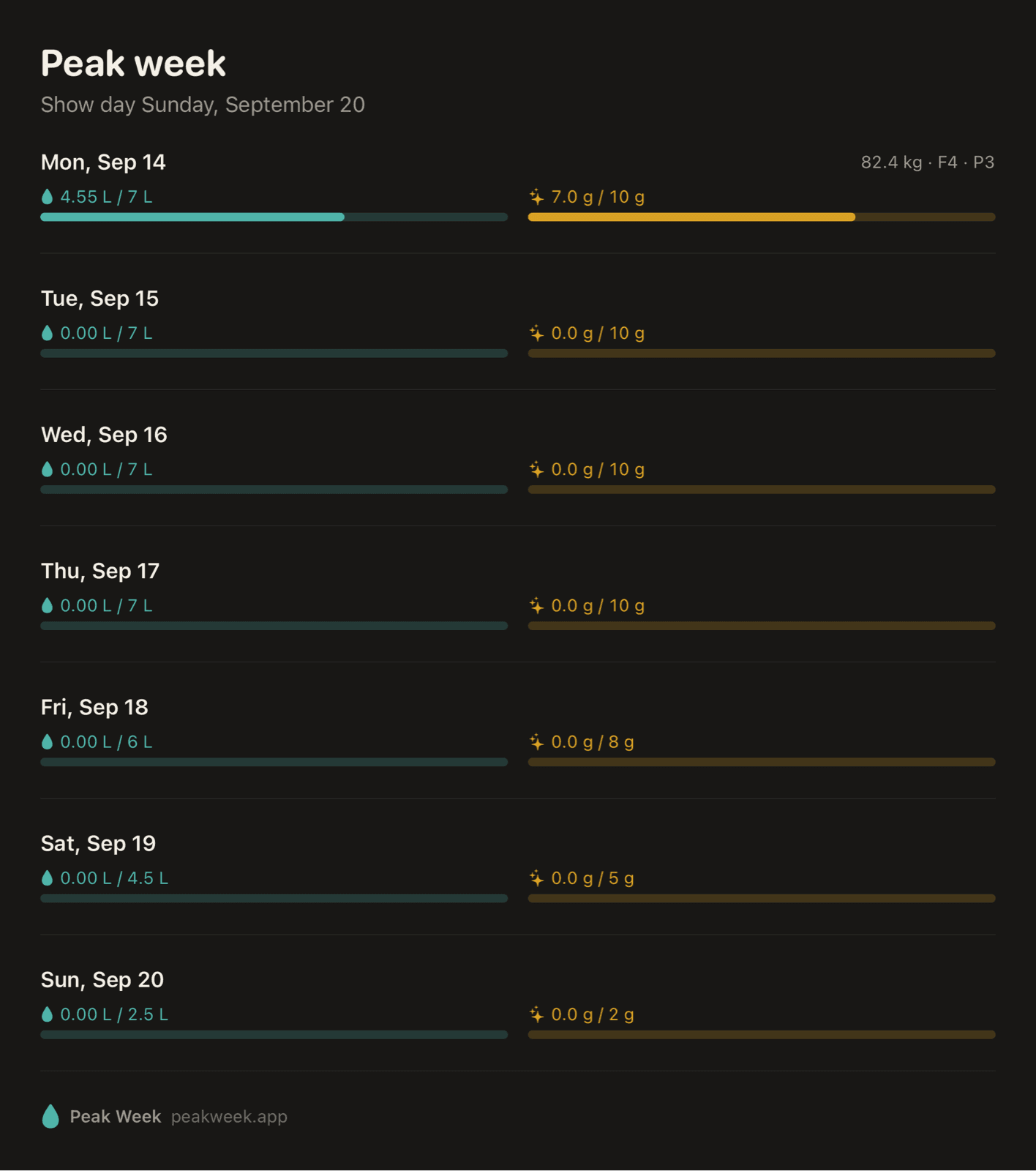
Logged versus target for every day up to the show, water and salt side by side. The day strip at the top of the app carries the same two bars, so you see the taper without opening anything.
Tap a day to open it, edit an entry, or fix a target.

Share cards
Send your day to your coach.
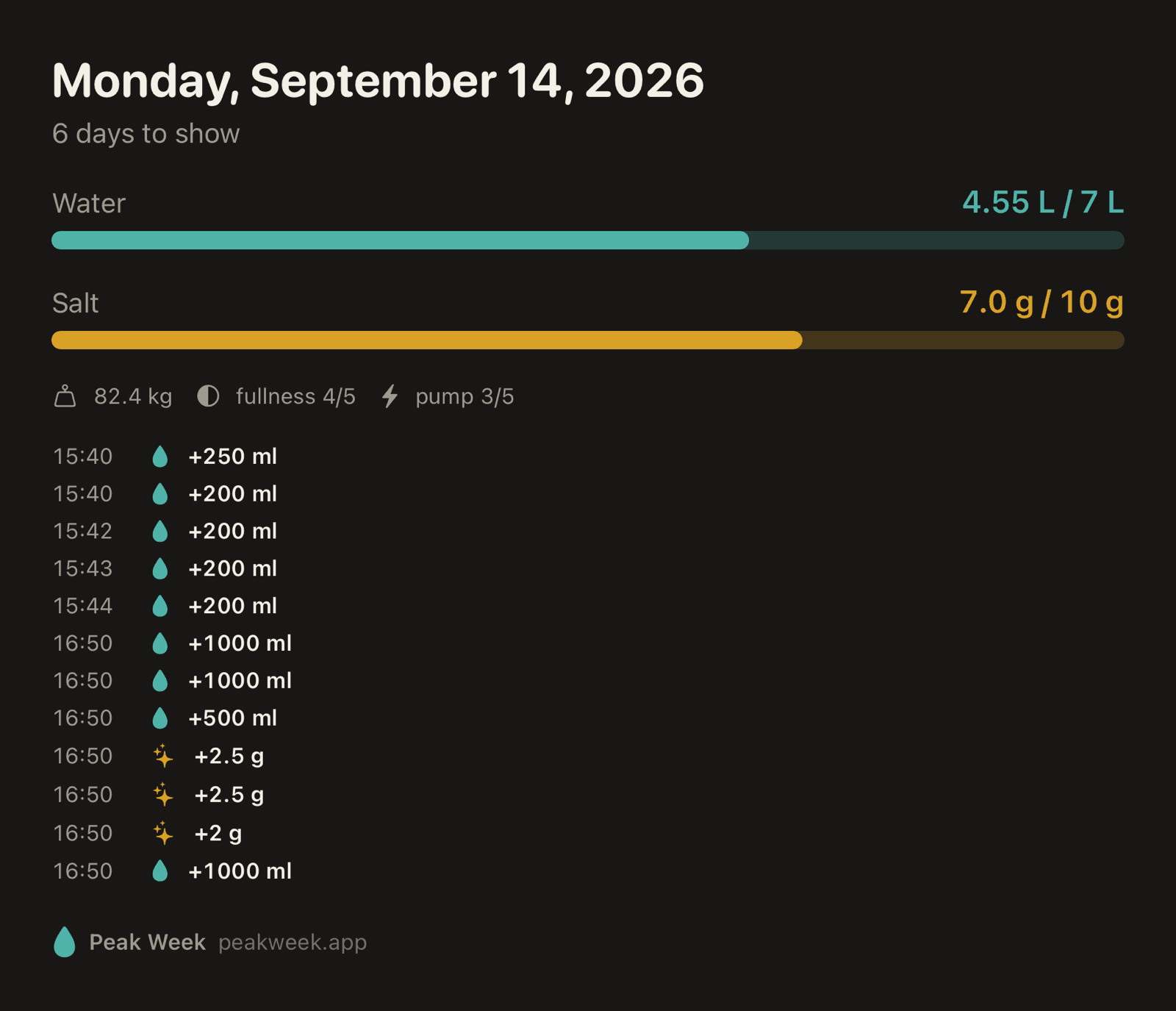
One tap renders the day or the week as an image or PDF: targets, totals, notes and every entry with its time. Send it in WhatsApp or drop it in your check-in.
Or copy it as plain text. The export is English with dot decimals, made to paste into a chat with a human coach or an AI one.
Widgets · Control Center · Siri
Log without opening the app.
Peak week is busy enough. Every entry can be logged from the home screen, the lock screen, Control Center or Siri, and the app, widgets and Mac all update the moment you do.
Home screen widget
Quick-add buttons for water and salt with today’s progress.
Lock screen
Progress ring and pace status at a glance.
Control Center
Log a preset amount without unlocking (iOS 18).
“Hey Siri, add 500 ml of water in Peak Week”
Added 500 ml. 1.95 L left today, you’re on pace.
Siri & Shortcuts
Add water, add salt, ask for today’s status. Automate the rest.
Mac
Also on your Mac, and in the menu bar.
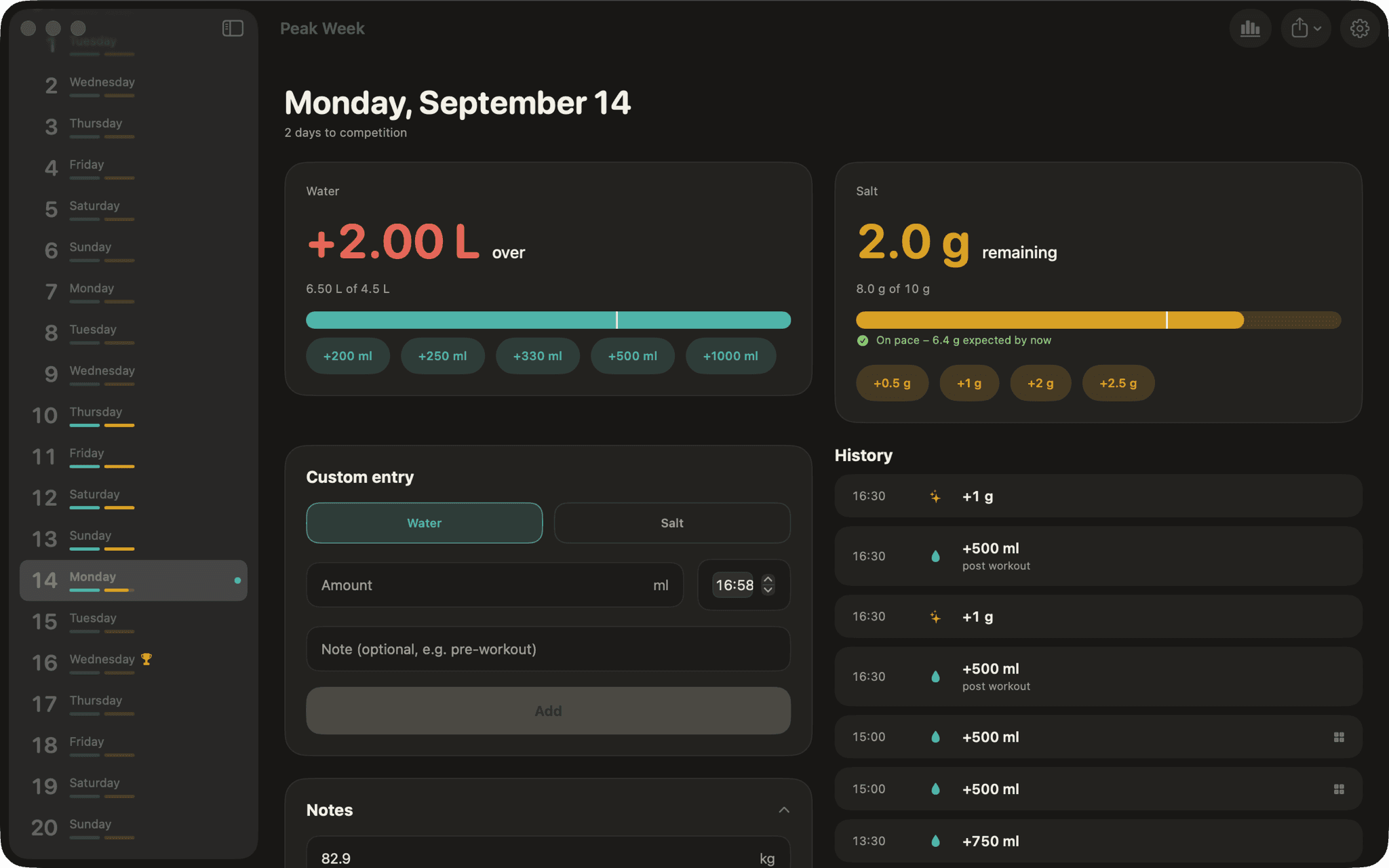
The same app on macOS with a day sidebar and a two-column layout. A menu bar extra shows your pace and logs a preset amount without bringing a window forward.
Turn on iCloud sync and the phone and the Mac stay in step. Log a glass on the Mac and the iPhone widget updates.
The details
Built for one week that matters.
Effective-dated targets
Change a target from any day onward. Past days keep the target they had, so your history stays honest.
Day notes
Weight, fullness and pump on a 1–5 scale plus free text, right under the cards. Included in exports.
Salt or sodium
Show salt in grams or sodium in milligrams. Enter either, the app converts (1 g salt = 400 mg Na).
Custom entries
Any amount, any time of day, with an optional note like “pre-workout”. Edit or delete later.
Undo
Tapped the wrong preset? Undo from the toast. Nothing is ever more than one tap away from fixed.
Smart reminders
Only when you are behind pace, only inside your day window, and always with the amount to catch up.
Competitions
Keep past shows around. The next upcoming one drives the countdown, the week and the plans.
Dark and light
Dark by default, a warm light palette when you want it. English and German.
Free
No subscription, no in-app purchases, no account.
Privacy
Your numbers are yours.
What you drink and how much salt you take in the week before a show is nobody’s business but yours and your coach’s.
Read the privacy policy →No account
Open the app and start logging. There is nothing to sign up for.
Data stays on your devices
Entries live in a local database. We run no servers and never receive a copy.
Optional iCloud sync
Turn it on to keep iPhone and Mac in step through your own iCloud account. Off by default.
No analytics, no ads
No tracking SDKs. The App Store label is “Data Not Collected”.
Peak week starts on your phone.
Free for iPhone and Mac. Set your show date, pick a plan, and log the first glass.
iOS 18+ · macOS 15+
Peak Week is a log, not medical advice. Extreme water or sodium changes can be dangerous. Set your numbers with a qualified coach or doctor.